HOTEND / Software
Cura 5.14 Lets You Paint Where Supports Should—and Shouldn’t—Go
The stable Cura update adds paint-on support placement, sturdier tree-support controls, and a clearer way to inspect bridges before printing.
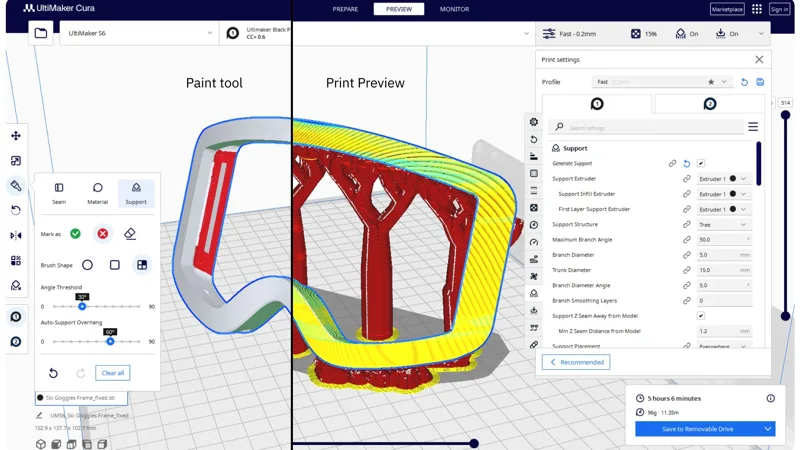
A small overhang doesn’t always need the forest of support material a slicer gives it. In UltiMaker Cura 5.14, makers can brush directly onto a model to tell the slicer where to enforce supports, where to avoid them, and where to leave the decision to automatic generation.
The feature is part of the stable Cura 5.14.0 release, listed on GitHub on November 5, 2026. Support painting had already appeared in an experimental 5.14 alpha in June; this release brings it into the main version of the open-source slicer.
Paint the contact area, then check the slice
Support painting gives makers a local override for a decision that would otherwise be driven largely by automatic overhang detection and settings. UltiMaker says you can use it to add or block support on top of an automatic layout, or make a layout by hand. An overhang-angle slider adjusts the automatic portion.
There are shortcuts for larger or more precise selections, too. The release notes describe selecting an entire contiguous face or curved feature with Paint Surface, or holding Shift or Shift plus Ctrl to draw straight support lines.
Consider a decorative part with a flat underside and one delicate protrusion. Instead of accepting every automatic contact point, you could try enforcing support beneath the protrusion while avoiding a visible surface that prints well without it. That may save material and cleanup, but the tradeoff depends on the model, orientation, and printer: removing a support that looked unnecessary in the slicer can leave a real overhang to sag.
The paint marks regions for support generation; it is still worth slicing and inspecting the resulting toolpaths before committing to a print. Cura 5.14 also gives bridges and overhangs distinct colors in layer preview, making it easier to see which lines the slicer expects to print over unsupported space.
More control over the supports themselves
The update doesn’t stop at placement. UltiMaker’s release announcement describes new controls intended to make tree supports less prone to wobbling or being knocked over. These include branch smoothing, more granular support-wall thickness, gradual wall-thickness transitions, and settings for the size and shape of support bases.
That matters on a tall print where a narrow branch has to survive repeated nozzle passes before it reaches the part. A broader base or smoother transition may help, though a sturdier structure can also mean more material and cleanup. The best settings will depend on the shape being supported.
A tidier settings panel
Cura’s settings now use a tabbed layout by default. The release notes credit Aldo Hoeben’s Tabbed Settings plugin as the inspiration and HellAholic for contributing the integration. For anyone accustomed to scrolling through a long settings list, it’s a navigation change rather than a new print process—but one that should make the expanded support controls easier to find.
Other additions include a Windows on ARM build, revised handling of small roof and floor areas, and fixes to the Pause at Height post-processing script. The release also updates Cura’s underlying UI framework; the alpha discussion warned that the change could affect some community plugins, so plugin-dependent users should check their own setup after upgrading.
The useful combination here is placement plus preview: paint only where you want to intervene, slice, and examine the result. It gives makers another way to trade support strength against surface finish without surrendering the whole decision to an automatic layout.
Sources.
Original reporting, references, and further reading.